
Contact Us Page Alternative | Free customer Support Tool | Voiceem
Meta description: Tired of a contact form nobody answers? See how Voiceem replaces it for free, with a Share Page link or QR code, using a real working example.
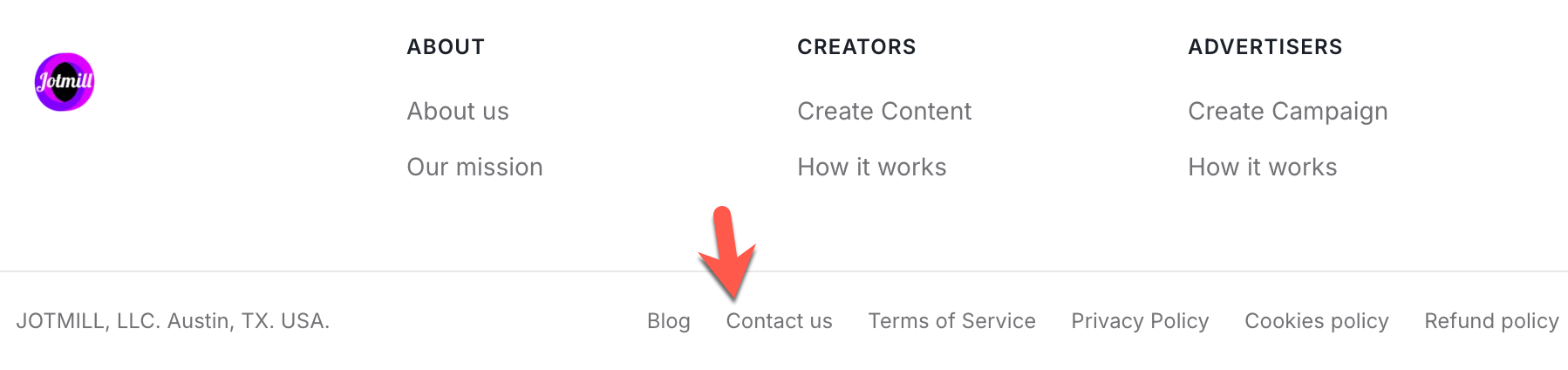
Quick Answer: A standard embedded contact form has one job: collect a message and disappear. There's no record the sender can check, no visible history of how the business handles issues, and often no reply at all. Voiceem works as a free customer support tool instead: a business's page becomes the actual Contact Us destination, where anyone can post a question or complaint that stays visible, and the business can respond publicly on the feed or privately through Direct Messaging. Jotmill, a sister product to Voiceem, already uses exactly this setup, its own website footer "Contact Us" link goes straight to its Voiceem page, not a form.
The Problem With a Standard Contact Form
An embedded contact form is a dead end by design. Someone fills it out, hits submit, and from that point on has no way to know whether it was read, whether anyone is working on it, or whether it's been ignored entirely. There's no record for the person who submitted it to point back to, and no visible pattern for anyone else to check before reaching out themselves.
That silence is a trust problem, not just an inconvenience. A prospective customer who wants to know how a business handles issues has nothing to look at, a contact form doesn't show its own history. Compare that to a page where every question, complaint, and response is visible: customer support without a help desk actually starts with something a form can never offer, a visible track record.
For Businesses With an Online Presence: Do What Jotmill Does
This isn't hypothetical. Create a free profile page on Voiceem for your business, product, service, or event. Once it's created, open the page, click the three dots in the top-right corner, select "Share Page," and copy the generated link. Add that link to your website as your Contact Us destination.
Jotmill does exactly this. Click "Contact Us" in Jotmill's website footer, and instead of opening a traditional form, it goes straight to Jotmill's own linked page on Voiceem. From there, anyone can post a question, a bug report, or a billing issue, under categories like Inquiries and Complaints & Bugs, specific to what Jotmill actually needs to track. Jotmill's team can then respond directly: publicly in the feed for everyone to see, or privately through Direct Messaging if the issue needs a one-on-one conversation.
Jotmill didn't build a separate support widget or bolt on a help desk. It pointed its own Contact Us link at a page it already had, and that page does the job. That's the whole idea behind a contact us page alternative, not a new tool to manage, just a different destination for the link that's already there.
How "Share Page" Works on Voiceem (Step-by-Step)

Create your Voiceem profile page. Go to Voiceem and create a free profile page for your business, product, service, event, or any offering. Once it's created, open your profile.
Get your Share Page link. Click the three dots in the top-right corner of your profile page, select "Share Page," and copy the link Voiceem generates.
Add the link to your website. Go to your Contact Us section and replace your traditional contact form with the Share Page link. Now, when visitors click Contact Us, just like on Jotmill's site, they land directly on your business profile page.
Let customers post directly. Customers can post questions, complaints, bug reports, billing issues, or general feedback. Their posts appear as Voices under relevant tags like Inquiries or Complaints & Bugs.
Respond to customers easily. Reply publicly on the feed when the answer helps everyone, or privately through Direct Messaging for one-on-one issues like billing or account problems.
No support widget needed. No separate form, help desk, or ticketing system to build, your Voiceem page becomes the support destination, exactly how Jotmill uses it.
Optional: add your QR code too. Download the QR code from the top of your profile and embed it on your website, so customers can scan it as well as click the link.
You're done. Customers can reach you anytime, their feedback lands in one place, and you respond publicly or privately, all through your existing Contact Us link.
For Businesses Without an Online Presence: Use the QR Code Instead
If you don't have a website and only operate a physical, brick-and-mortar store, you can still collect customer feedback and connect your business to Voiceem's features for free, using a QR code instead of a link.
Voiceem automatically generates a unique QR code for every new business or service profile page, including your logo. If you already have a profile, you'll find it near the top of your page, with options to print it or download it as a digital file. Print it and place it anywhere in your store, a counter, a receipt, a table card, and customers can scan it to open your Voiceem page directly and leave feedback. It works like having customer support available anytime, without needing a website at all.
If your business does have a website, the same QR code can be embedded there too, alongside your Share Page link, as part of a formless Contact Us destination.
How to Use Voiceem QR Codes for Physical Stores (Step-by-Step)

Create your business or service profile page. Go to Voiceem and create a new profile, filling in your business details.
Locate your QR code. Open your profile and look near the top of the page, it's generated automatically for every new page.
Download or print it. Print a physical copy or download it as a digital file. It automatically includes your profile page's logo.
Place it in your store. Put it at your entrance, counter, or tables, and encourage customers to scan it.
Collect feedback without a website. Customers scan it to leave feedback, and you can respond, answer inquiries, and improve service, all without needing a website.
Optional: use it on your website too. If you do have a website, upload the QR code image to your Contact Us section alongside your Share Page link.
Why Public-Plus-Private Beats a Form That Goes Nowhere
A contact form can only do one thing: receive. It can't show a visitor that other people have reached out before and gotten real answers. Voiceem does both sides of that job at once, every public response becomes proof the business actually replies, and every private message handles the parts that shouldn't be public, like account details or a refund conversation. A customer support platform built this way earns trust from people who never even had an issue themselves, just by seeing how past ones were handled.
How to Set This Up for Your Own Business
If your business already has a page on Voiceem, whether you created it or someone else did, subscribing and linking your business profile page is the only step before this works exactly like Jotmill's setup. If it doesn't exist yet, creating one takes a few minutes, and it works even for a business with no website at all. Once linked, the page comes with a free QR code too, so the same direct customer contact channel can live on a receipt, a table card, or a storefront sign, not just a website footer.
What This Costs
Creating your business profile page on Voiceem, using the QR code, and collecting feedback from your customers is completely free. In fact, your customers can even earn rewards when they provide feedback on Voiceem.
To directly contact and engage with your customers, both publicly on the feed and privately through messaging, you only need a small subscription to Voiceem. This lets your business reach out to customers who are active on the platform and respond to their feedback in real time.
Either way, there's no separate support software to buy or set up, the page doing double duty as both a review destination and a contact channel is the entire model.
Frequently Asked Questions
Can a business really use a review page as its official Contact Us page?
Yes. Jotmill does exactly this, its website's Contact Us link routes directly to its own linked profile page on Voiceem, where users post questions and Jotmill responds publicly or privately.
Is this different from a normal contact form?
Yes. A contact form is one-way and leaves no visible record. A Voiceem profile page keeps every question and response visible, and lets a business reply privately through Direct Messaging when that's more appropriate.
Do I need a website to set this up?
No. A page can be created and used this way even by a business with no website at all, using the QR code instead of a website link.
Is responding to messages free?
Creating your profile page, using the QR code, and collecting feedback is completely free. Directly engaging with customers, both publicly and privately, requires a small subscription to Voiceem.
What if my business doesn't have a page yet?
You can create one directly for free, there's no requirement that a page or business already exists online first.